Woodturning
- 3.8
- Rating
- 100.00M
- Installs
- Free
- Price

 Analysis by App-foxy
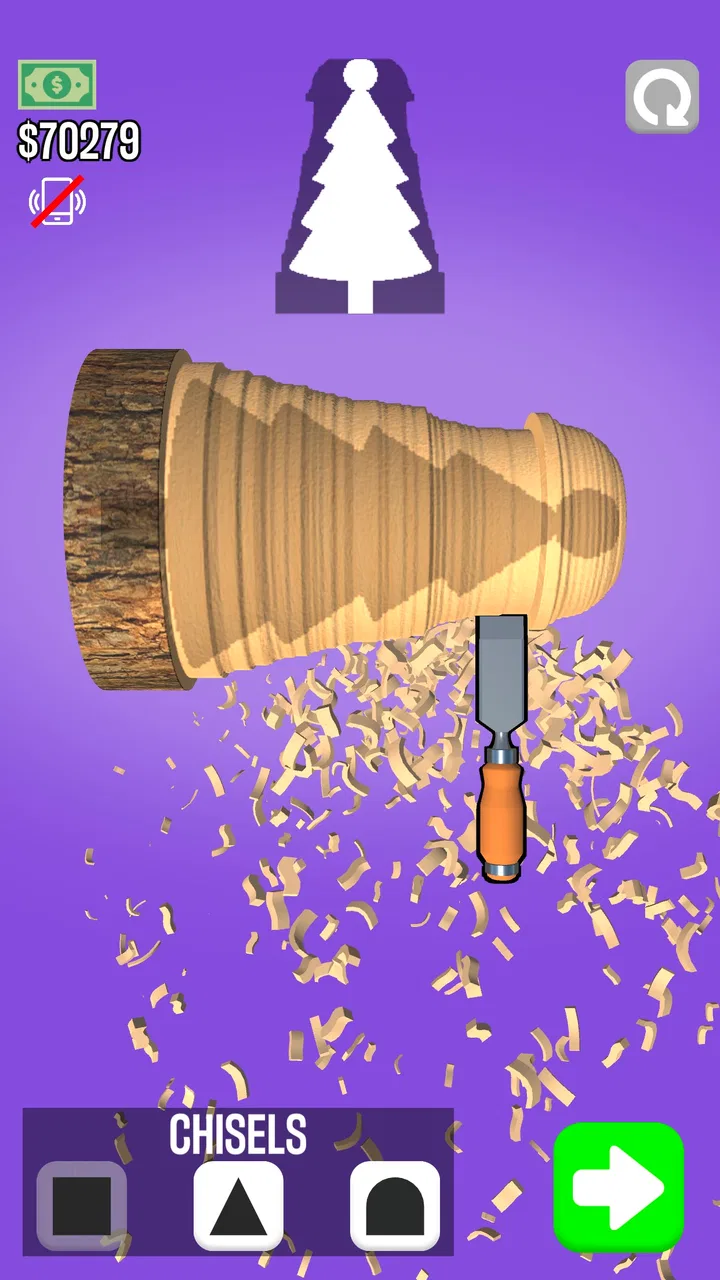
Woodturning is the kind of mobile game I open when I want something quiet, tactile, and easy to understand within seconds. Developed by VOODOO, it turns the basic idea of shaping a piece of wood on a lathe into a short simulation experience built around observation and control. The store summary says “One to rule them all,” while the short description simply calls it “Woodturning,” but the real appeal is more practical: I can start a small project immediately, make visible progress with each swipe, and stop without needing to remember a complicated story or control scheme.
That simplicity explains why the game has reached over 100 million installs and collected an average rating of 3.8 from around 575 thousand ratings. Those figures suggest a broad audience, but they also hint at the central trade-off. This is accessible rather than deep in the traditional simulation sense. I would recommend it to someone who enjoys shaping, smoothing, and finishing objects through touch. I would not recommend it to a player looking for a detailed workshop economy, realistic equipment management, or a long strategic campaign.
How the shaping decisions actually feel
The first thing I noticed is that the game makes every movement feel consequential without making the controls intimidating. The object rotates while I work on it, and my job is to remove material carefully enough to approach the intended form. A broad swipe can change the silhouette quickly, while a slower, more measured movement gives me better control near edges and narrow sections. That creates a small but satisfying decision space: do I remove more now to save time, or preserve the shape and refine it gradually?
You May Also Like

 Blood Strike: 2.5 Anniversary
Blood Strike’s Loadouts Turn Every Drop Into a Tactical Gamble
A close look at Blood Strike’s custom loadouts: how fast access to signature weapons reshapes its battle royale rhythm, rewards preparation, and narrows the gap between fights.

 Pandora - Music & Podcasts
Pandora’s Music Is Easy to Start, but Harder to Recover
Pandora’s strength is its low-effort path from a seed to a station. Its weak spot is how much confidence it asks you to place in connection, setup, and quiet recovery.

 8 Ball Pool
 Is Built on Rivalries, Rematches, and Routine
A close look at the rivalries, rematches, shared routines, and unanswered safety questions that turn a quick pool match into a persistent mobile community.

 Samsung Music
’s Quiet Strength Is Playing What You Already Own
Its reach comes less from spectacle than from dependable access to a personal library. That simplicity is both the app’s strongest retention engine and its ceiling.

 AccuWeather: Weather Radar
AccuWeather Review: A Quick, Clear Forecast for Everyday Decisions
For everyday plans, the best forecast is the one you can understand quickly. AccuWeather makes rain timing, radar, and local conditions easy to act on, with a few trade-offs.

 Hill Climb Racing
Why Hill Climb Racing Still Turns Crashes Into One More Run
A tiny car, a bumpy hill and one more upgrade: Hill Climb Racing keeps resurfacing because its simple chaos makes every near-miss feel personal.
More From Our News Desk
View All News


I found that the best approach is to think in stages rather than chase the final outline immediately. I begin by identifying the widest parts of the piece and reduce the excess around them. Once the general profile is visible, I switch to smaller corrections. This is more reliable than trying to make the entire object perfect in one pass, because an early aggressive cut can make later adjustments awkward. The useful skill is not fast swiping; it is knowing when to stop removing material.
That planning habit gives Woodturning more character than its short sessions might suggest. The game does not ask me to memorize a complex system, but it does reward a simple workflow: establish the large shape, protect the thin areas, then refine the transitions. I especially enjoyed the moments when a rough cylinder gradually became recognizable. The satisfaction comes from seeing a vague form become deliberate, not from managing a large collection of statistics or menus.
The touch interaction also makes the game suitable for casual play. I do not need a long uninterrupted session to understand what I am doing. A quick break can be enough for one shaping attempt, and the visual feedback makes it obvious whether I am making progress. This is one reason I see it working well for people who usually avoid simulation games: it presents the physical idea of turning wood without requiring prior knowledge of woodworking.
Why patience matters more than speed
There is a temptation to swipe quickly because removing material produces immediate visual change. In my experience, that is where most avoidable mistakes begin. Fast movements are useful when clearing obviously unnecessary material, but they become risky around corners, shoulders, and narrow sections. I get better results by slowing down whenever the object starts to resemble the target.
This creates a modest risk-and-reward loop. A bold movement can bring the piece close to its final form in moments, but it can also leave me with an uneven contour that is difficult to correct. A cautious pass takes longer, yet it keeps more options open. That is an important distinction: the game is not really testing reflexes. It is testing whether I can balance visible progress against the possibility of overworking one area.
I also learned to judge the silhouette from more than one angle. Because the piece turns, a profile that looks correct during one part of the rotation may reveal a bump or flat spot elsewhere. Watching the full rotation before making another major cut helps me avoid reacting to a single view. This is a small habit, but it changes the experience from random swiping into a repeatable inspection process.
For an everyday example, I would compare it to using the game during a short commute or while waiting for an appointment. If I rush because I expect to finish instantly, the interaction feels less satisfying and the result is less controlled. If I treat the session as a miniature craft task, with a quick inspection between passes, the same short period feels more purposeful. That makes it a better fit for relaxed attention than for frantic multitasking.
When experimentation helps and when it does not
Woodturning encourages experimentation because the consequences are easy to see. I can try a different approach on the next piece and notice whether a more conservative opening pass gives me a cleaner result. This makes the game approachable for younger players as well as adults, and its Everyone content rating reflects that broad accessibility.
Still, experimentation is not always equally valuable. If I repeat the same broad swipe pattern without checking the changing profile, I am not really learning; I am only reproducing the same mistake. The game becomes more rewarding when I deliberately change one part of my process at a time. For example, I might keep the initial shaping conservative but spend more time refining the outer transitions. That lets me tell whether the improvement came from better planning or simply from luck.
This is also where the game differs from more demanding simulation titles. A full workshop simulator might ask me to choose tools, materials, speeds, measurements, or production schedules. Woodturning strips those decisions away and concentrates on the hand movement and visual result. I appreciate that focus when I want a clean, low-pressure activity. Players who enjoy comparing equipment or optimizing a production chain will probably find the experience too narrow.
Adapting your approach as the shape changes
The most useful adaptation is to stop treating every section of the object alike. Wide, simple areas can tolerate a confident pass, while thin protrusions need a lighter touch. I found myself changing the speed and length of my swipes depending on the local shape rather than following one fixed rhythm. That adjustment is what keeps the game from feeling completely automatic.
Another practical tip is to leave a little extra material near difficult transitions until the surrounding form is stable. If I perfect one edge too early and then reshape the neighboring area, I may have to correct the edge again. Working from the broad structure toward the details reduces that backtracking. It is a small planning horizon, but it makes each attempt feel cleaner and less wasteful.
The finishing stages are where I notice the difference between a merely completed piece and one that looks considered. Once the major excess has gone, I pay attention to bumps, abrupt changes, and uneven spacing. The final passes should be corrections, not another opportunity to redesign the whole object. When I continue making large movements at that point, I usually create more problems than I solve.
This is a good example of counterplay in a very simple game: the game invites speed through immediate visual feedback, while the better response is restraint. I do not need a complicated enemy or timer for that tension to exist. My own impulse to keep cutting becomes the obstacle. The more I recognize that, the more consistent my results become.
There is also a useful distinction between a visually pleasing result and a technically tidy one. Sometimes a small irregularity gives the object a more natural appearance, while an overly aggressive attempt to make every line perfectly even can make the shape look stiff. I prefer to correct clear mistakes but avoid endless micro-adjustments. That keeps the session relaxing instead of turning it into a perfection test.
What the game does well for different players
For a casual player, the strongest feature is immediate readability. I can understand the objective without studying instructions, and the visual transformation supplies its own reward. For someone interested in digital sculpting, the game offers a gentle introduction to subtractive shaping: remove material, inspect the form, and refine the result. It is not a replacement for a serious creative tool, but it can make the basic logic of carving feel approachable.
Parents may also appreciate that the game is easy to explain and carries an Everyone age rating. However, free availability does not mean the experience is entirely free of commercial considerations. The game is listed as free, with optional in-app purchases ranging from about two dollars to around 155 dollars per item. I would keep that in mind before handing it to a child, particularly if the device allows purchases without an adult check.
For adults, the better use case is decompression rather than achievement hunting. I can play while listening to a podcast or taking a short mental break, although I prefer giving the shaping itself enough attention to make deliberate movements. The game is calming when I accept its narrow focus. It becomes repetitive if I expect every session to introduce a major new system or a dramatic change of pace.
Players who should skip it are those seeking a realistic woodworking simulator with detailed material behavior, tool selection, or workshop planning. They may be happier with a more specialized simulation. I would also steer away anyone who needs competitive multiplayer, a strong narrative, or a deep long-term progression structure. Woodturning is about the immediate act of shaping, and its strengths are tied closely to that limited scope.
How it compares with familiar simulation alternatives
Compared with management simulations, Woodturning removes the administrative layer. There is no need to balance staff, inventory, budgets, or schedules in the experience I had. That makes it much easier to pick up, but it also means there is less strategic variety from session to session. If your favorite part of simulation games is optimizing a system over many hours, this will feel lightweight.
Compared with open-ended creative apps, it offers more structure. I am not starting with an empty canvas or unlimited modeling tools; I am working toward a shaped object through a focused sequence of decisions. That constraint is helpful when I want direction, but limiting when I want complete artistic freedom. The game sits between a toy-like craft activity and a conventional simulation, prioritizing guided interaction over unrestricted creation.
It also differs from reflex-based casual games. The important question is rarely whether I can move my finger quickly enough. It is whether I can read the form and choose a suitable level of pressure and speed. That gives it a calmer rhythm than many quick-play titles, although players who need constant action may find the pace too gentle.
The developer is VOODOO, a name associated here with a broadly accessible mobile format, and the game’s large install base shows how effectively that format travels. I would not interpret its popularity as proof that it will satisfy every simulation fan. Instead, I see it as evidence that the central interaction is easy for many people to understand, even if the long-term depth depends heavily on how much enjoyment they get from repeating and refining the same basic craft process.
What remains engaging over time
My interest in Woodturning depends on changing my own goals. At first, I simply wanted to complete the shapes. After that, I started focusing on cleaner transitions and fewer corrective passes. Those self-imposed targets gave the familiar interaction more depth. Without them, the game can begin to feel like a sequence of similar tasks rather than a developing skill.
The current version is 3.12.34, and the game requires Android 8.0 or later. Those details matter if you are checking compatibility before installing, especially on an older phone or tablet. The free entry point makes trying it easy, but I would still consider the purchase model and the possibility of repetition before deciding whether it deserves a permanent place on your device.
One trade-off I noticed is that the game’s accessibility can work against its longevity. Because the controls are so easy to grasp, there is little initial friction. That is excellent for a first session, but it also means the game must rely on the pleasure of refinement rather than a steep learning curve. I kept playing when I was in the mood for small improvements; I was less interested when I wanted a new type of challenge.
That makes the best long-term strategy personal. If you enjoy setting a quality standard for yourself, you can treat each object as a chance to improve your workflow. If you need the game itself to introduce increasingly complex planning problems, the experience may not hold your attention as well. I would describe its depth as procedural and hands-on, not systemic.
My verdict on the balance between simplicity and depth
After spending time with it, I see Woodturning as a polished casual simulation built around one clear pleasure: watching careful touch control turn a rough form into something recognizable. Its decision-making is small but meaningful when I plan the broad shape first, inspect the full rotation, and reserve patience for the final passes. The game rewards restraint more than speed, which gives its simple interaction a surprisingly pleasant rhythm.
Its limitations are just as clear. The experience can become repetitive, and it does not offer the kind of detailed workshop management or open-ended creation that specialist players may expect. The free model is convenient, but the listed in-app purchase range means I would review purchase settings before allowing unsupervised play. These are not reasons to reject it outright; they are reasons to choose it for the right purpose.
My recommendation is simple: try it if you want a quiet, tactile break with light simulation elements, but skip it if you need deep systems or constant novelty. I would hand it to a friend who likes relaxing mobile games, visual progress, and small skill-based challenges. I would not present it as a complete woodworking experience. For me, its success comes from making a narrow idea feel satisfying without demanding a large time commitment, and that is enough to make it worth trying for the right player.
FAQs for Woodturning
01What is Woodturning, and how does the gameplay work?
Woodturning is a creative simulation game where players carve, polish, and paint wooden objects to meet specific designs. The gameplay involves using various tools to shape the wood, aiming for precision to match customer requests. Success in crafting leads to higher scores and unlocking new tools and challenges.
02Is Woodturning free to play, or are there in-app purchases?
Woodturning is free to download and play, but it includes in-app purchases. Players can buy additional tools, remove ads, or acquire other enhancements to improve their gameplay experience. These purchases are optional and designed to help users progress faster or customize their tools.
03What are the system requirements for Woodturning on Android and iOS?
To run Woodturning smoothly, Android users need a device with at least Android 5.0, while iOS users require iOS 10.0 or later. The game is optimized for both platforms, but newer devices will provide a better experience due to improved graphics and processing capabilities.
04Does Woodturning require an internet connection to play?
Woodturning can be played offline, which is perfect for users who want to enjoy the game without constant internet access. However, certain features, such as in-app purchases and leaderboard updates, will require an internet connection to function properly.
05Is Woodturning suitable for children, and does it include any inappropriate content?
Woodturning is suitable for all ages and does not contain any inappropriate content. The game focuses on creativity and precision, making it a great option for children and adults alike. Parents can feel confident allowing their children to play without concerns about unsuitable material.
Pros
- Intuitive controls make carving easy.
- Realistic wood textures enhance experience.
- Variety of tools for diverse designs.
- Relaxing gameplay with no time limits.
- Frequent updates with new features.
Cons
- Limited depth in long-term gameplay.
- Ads can disrupt the creative flow.
- Occasional lag on older devices.
- Limited customization for tools.
- In-app purchases can be costly.

Woodturning
Gallery